Create HPC Apps for use in the Discovery Environment (DE)
In order to create a High-Performance Computing (HPC) app for the DE that runs at TACC (the Texas Advanced Computing Center), the app must be created through the Tapis v3 API.
The Tapis v3 App docs can be referenced along with this guide when creating a new HPC app for the DE, and for other details beyond the scope of this guide.
If you have created HPC apps with Tapis v2 (formerly known as Agave) for the DE in the past, then the guide Tapis v2 (Agave) App migration to v3 for the Discovery Environment can help you migrate your v2 apps so they can be used in the DE once again.
Tapis curl command setup
Please note that the API server at cyverse.tapis.io
does provide its own UI for creating apps,
but it is limited in scope and does not allow for adding JSON notes fields,
which are used by the DE to display different parameter field types beyond simple text field inputs
(such as checkboxes, selection lists, and file/folder inputs).
It also does not currently allow editing of existing apps.
So this guide will use curl commands to interface with the cyverse.tapis.io API
(but there are other options detailed in the
Tapis "Getting Started" guide).
The following shell environment variables and curl command aliases
will be used in the examples throughout the rest of this guide.
Set env var TAPIS_ACCESS_TOKEN
Assuming the env vars CYVERSE_USERNAME and CYVERSE_PASSWORD are set,
this command will call the
/v3/oauth2/tokens endpoint
and store the resulting Tapis JWT in the env var TAPIS_ACCESS_TOKEN:
export TAPIS_ACCESS_TOKEN=$(curl -H "Content-Type: application/json" -s -d "{\"username\": \"$CYVERSE_USERNAME\", \"password\": \"$CYVERSE_PASSWORD\", \"grant_type\": \"password\" }" https://cyverse.tapis.io/v3/oauth2/tokens | jq -r .result.access_token.access_token)
Note the use of the jq command to parse out the
access_token from the API response.
Set a curl alias that references the TAPIS_ACCESS_TOKEN
alias curl-tapis='curl -H "X-Tapis-Token: $TAPIS_ACCESS_TOKEN" -H "Content-Type: application/json"'
List Systems
If the env vars and alias above are set up correctly, then a command like the following (which calls the /v3/systems endpoint) should return some results.
curl-tapis -s "https://cyverse.tapis.io/v3/systems?select=id,enabled,systemType,owner,canExec,isPublic&listType=ALL"
Note that these API endpoints return JSON output, which can be formatted by another command like jq, but the remaining example commands in this guide will omit piping outputs to formatting commands.
Tapis v3 App Definition
First consider a Tapis v3 app definition like the following:
{
    "id": "CyVerse-QA-Test-App",
    "version": "0.1",
    "tenant": "cyverse",
    "description": "QA Test app for all parameter types.",
    "runtime": "ZIP",
    "containerImage": "tapis://data.cyverse.org/home/api/v3/apps/CyVerse-QA-Test-App-0.1.tgz",
    "jobType": "BATCH",
    "tags": ["QA", "test"],
    "notes": {
        "name": "CyVerse QA Test App",
        "helpURI": "https://learning.cyverse.org/de/create_hpc_apps/",
        "outputs": [
            {
                "name": "requiredOutput",
                "description": "Output File command line option.",
                "arg": "out.txt",
                "details": {
                    "label": "Output File"
                }
            }
        ]
    },
    "jobAttributes": {
        "execSystemId": "stampede3",
        "maxMinutes": 100,
        "parameterSet": {
            "envVariables": [
                {
                    "key": "NEW_ENV_VAR",
                    "value": "testing env",
                    "inputMode": "INCLUDE_ON_DEMAND"
                }
            ],
            "appArgs": [
                {
                    "name": "requiredOutput",
                    "description": "Output File command line option.",
                    "arg": "out.txt",
                    "inputMode": "REQUIRED",
                    "notes": {
                        "details": {
                            "label": "Output File"
                        },
                        "value": {
                            "default": "out.txt"
                        }
                    }
                },
                {
                    "name": "textInput",
                    "description": "Single-line text.",
                    "arg": "default_value",
                    "notes": {
                        "details": {
                            "label": "Text Input"
                        }
                    }
                },
                {
                    "name": "flagInput",
                    "description": "Checkbox input.",
                    "arg": "-f",
                    "notes": {
                        "details": {
                            "label": "Flag Input"
                        },
                        "value": {
                            "type": "flag"
                        }
                    }
                },
                {
                    "name": "flagInputAlt",
                    "description": "Another Checkbox input.",
                    "arg": "-f2",
                    "notes": {
                        "details": {
                            "label": "Flag Input 2"
                        },
                        "value": {
                            "type": "string"
                        },
                        "semantics": {
                            "ontology": ["xs:boolean"]
                        }
                    }
                },
                {
                    "name": "integerInput",
                    "description": "Integer input.",
                    "notes": {
                        "details": {
                            "label": "Integer"
                        },
                        "value": {
                            "type": "number"
                        },
                        "semantics": {
                            "ontology": ["xs:int"]
                        }
                    }
                },
                {
                    "name": "doubleInput",
                    "description": "Decimal input.",
                    "notes": {
                        "details": {
                            "label": "Decimal"
                        },
                        "value": {
                            "type": "number"
                        }
                    }
                },
                {
                    "name": "listInput",
                    "description": "List input.",
                    "notes": {
                        "value": {
                            "visible": true,
                            "required": false,
                            "type": "enumeration",
                            "order": 0,
                            "default": null,
                            "enum_values": [
                                {
                                    "--list val1": "Value 1"
                                },
                                {
                                    "--list val2": "Value 2"
                                },
                                {
                                    "--list val3": "Value 3"
                                }
                            ]
                        },
                        "details": {
                            "label": "Selection List"
                        }
                    }
                },
                {
                    "name": "requiredInput",
                    "description": "Required input file.",
                    "inputMode": "REQUIRED",
                    "notes": {
                        "details": {
                            "label": "Required Input File"
                        }
                    }
                },
                {
                    "name": "optionalInput",
                    "description": "Not required, excluded if empty.",
                    "notes": {
                        "details": {
                            "label": "Optional Input File"
                        }
                    }
                }
            ]
        },
        "fileInputs": [
            {
                "name": "requiredInput",
                "description": "Required input.",
                "inputMode": "REQUIRED",
                "targetPath": "*"
            },
            {
                "name": "optionalInput",
                "description": "Not required, excluded if empty.",
                "targetPath": "*"
            },
            {
                "name": "fixedInput",
                "description": "Fixed input.",
                "inputMode": "FIXED",
                "sourceUrl": "tapis://data.cyverse.org/home/shared/cyverse_training/example/coffee_cake.txt",
                "targetPath": "*"
            }
        ]
    }
}
If this app JSON was saved in a file named app.json,
then this app can be created with a command like the following,
which calls the
POST /v3/apps endpoint:
curl-tapis -s -d @app.json https://cyverse.tapis.io/v3/apps
If the app needs to be updated, save the updates to the same file and update the app with the PUT /v3/apps endpoint:
curl-tapis -s -X PUT -d @app.json "https://cyverse.tapis.io/v3/apps/CyVerse-QA-Test-App/0.1"
Tapis v3 App Details
The notes Field
The DE will use an app's notes fields to decide how to display and validate certain app fields and parameters,
such as app and parameter name and label display fields,
if those notes fields are formatted
similar to Tapis v2 app fields.
The DE will use the app's notes.label or notes.name,
followed by the app's version,
when displaying the app name in listings or the in the app launch form.
If no label or name is found in the app's notes,
then the DE will simply use the app's id.
Parameters and App Args
Now take the following appArgs parameter, for example:
{
  "name": "textInput",
  "description": "Single-line text.",
  "arg": "default_value",
  "notes": {
    "value": {
      "visible": true,
      "required": false,
      "type": "string",
      "default": "default_value"
    },
    "details": {
      "label": "Text Input"
    }
  }
}
If a notes.details.label field is not present,
then the DE will use the name as the parameter's form field label.
The description will be used as the help text displayed below the form field in the DE.
Note that the visible, required, and type fields could be omitted from the notes in this example,
since those are the defaults the DE will use for those parameter fields.
This text field will render like this in the DE's app launch form:

If the parameter has an inputMode field with a REQUIRED value,
then the DE will treat that parameter as required and ignore the
notes.value.required field.
If the parameter has an inputMode field with a FIXED value,
then the DE will treat that parameter as hidden and ignore the
notes.value.visible field.
The notes object can contain any other custom fields,
which will be ignored by the DE,
except for certain fields in specific parameter types,
detailed in the following sections.
Parameter Types
Inputs
If an input value is also required as a parameter on the command line,
then the name of the input in the fileInputs parameter field
should match the name of the corresponding appArgs parameter (or the key of the corresponding envVariables parameter).
The requiredInput field from the example above will render like this in the DE's app launch form:

If the app's runtime value is DOCKER,
then the DE will automatically prepend /TapisInput/
to the file or folder name submitted by the user,
since that is the directory mounted inside the container by Tapis for inputs.
Otherwise only the base name of the file or folder will be submitted
for the command line argument.
Outputs
The outputs field is not used by Tapis, but if a user wishes to create a
pipeline workflow with multiple Tapis and DE apps,
then the DE requires an app output to be defined so that it can be used as an
app's input in a subsequent step in the workflow.
If the output value is also required as a parameter on the command line,
then the name of the output in the notes field should match the name of the
corresponding appArgs parameter (or the key of the corresponding envVariables parameter).
The requiredOutput field from the example above will render like this in the DE's app launch form:
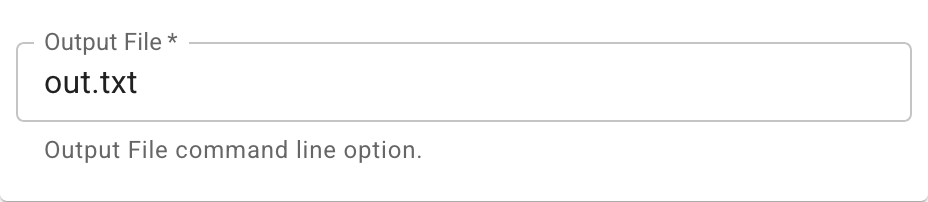
If the app's runtime value is DOCKER,
then the DE will automatically prepend /TapisOutput/
to the parameter value submitted by the user,
since that is the directory mounted inside the container by Tapis for outputs.
Otherwise the DE will automatically prepend output/
to the parameter value submitted by the user,
since that is the directory created and used by Tapis for app outputs.
Flags or Booleans
If the parameter has a notes.value.type field value of bool, boolean, or flag,
then the DE will display that parameter as a checkbox.
Parameters with a notes.semantics.ontology list where the first value is
xs:boolean will also display as a checkbox.
Note that the value of a parameter's arg is used in job submissions
when the user checks a flag parameter type in the submission form.
The flag fields from the example above will render like this in the DE's app launch form:

Enumeration Lists
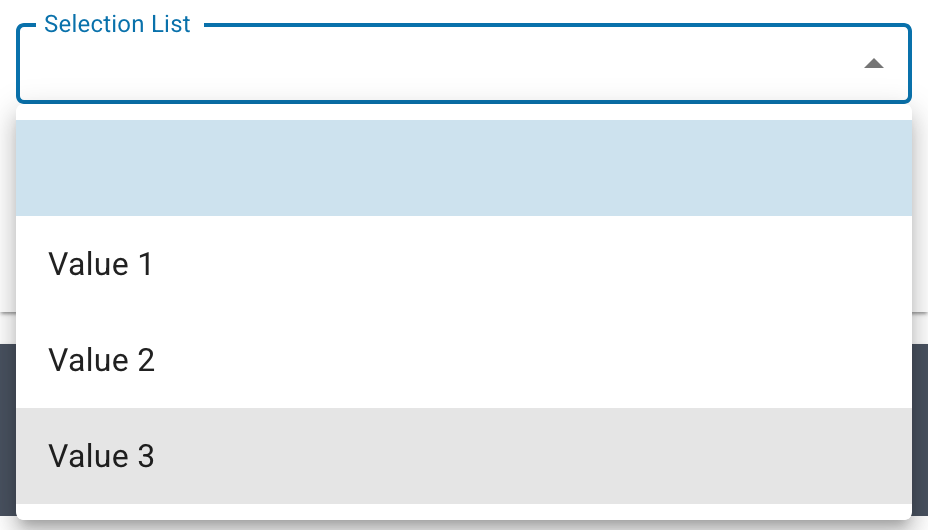
If the parameter has a notes.value.type field value of enumeration,
then the DE will display that parameter as a selection list.
The parameter should also have a notes.value.enum_values field
with an array of object values.
Each of these enum objects should have a key
that is the full command line argument that should be submitted as the parameter's arg value in the job submission,
and a value that will be used as the display label by the DE in the form's selection list.
The listInput field from the example above will render like this in the DE's app launch form:

Numbers
If the parameter has a notes.value.type field value of number,
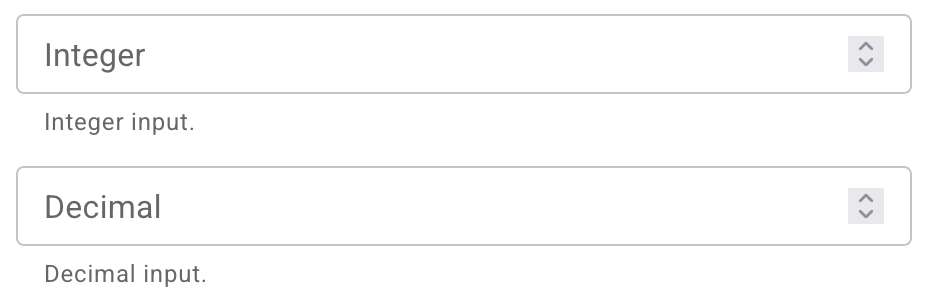
then the DE will display that parameter as a number field.
The DE will use the first xs:* value in the notes.semantics.ontology field to
determine if the user's input should be restricted to integers or decimal values.
See https://github.com/cyverse-de/mescal/blob/main/src/mescal/tapis_de_v3/params.clj for a list of supported number XSD types (otherwise defaulting to decimal values).
The integerInput and doubleInput fields from the example above will render like this in the DE's app launch form:
Make App Public
Once the app is tested and ready for sharing with all DE users, you can make the app public with the /v3/apps/share_public endpoint:
curl-tapis -s -X POST "https://cyverse.tapis.io/v3/apps/share_public/CyVerse-QA-Test-App"